DIGITT+ FAQs
+What is Digitt+?
Digitt+ is an Electronic Money Institution (EMI) regulated by the State Bank of Pakistan. We offer a range of digital financial services designed to make your money more convenient and accessible.
+How can I get the Digitt+ app?
You can download the Digitt+ app from the Google Play Store or the Apple App Store.
+Do I need to have a mobile number registered on my own CNIC to open a Digitt+ account?
You can open Digitt+ accounts without needing a mobile number registered on your own CNIC. However, for enhanced transactional limits (Rs.1,000,000/month), a mobile number registered on your own CNIC is required.
+Can I register for Digitt+ account with expired CNIC?
No, you cannot register for a Digitt+ account with an expired CNIC, as a valid CNIC is required for verification purposes. It is recommended to renew your CNIC before registering.
+Can Digitt+ account be accessed from outside of Pakistan?
No, Digitt+ can only be used in Pakistan.
+Can I receive OTP on some other mobile number?
You must use your own mobile number to receive the OTP (One-Time Password). Without it, you won’t be able to access your account. It is, therefore, recommended to set up or access your Digitt+ account using the mobile number you are actively using.
+Can I open more than one Digitt+ accounts?
No, you can only open one Digitt+ account on one CNIC.
+What are the services offered by Digitt+?
Digitt+ provides a wide range of digital financial services, including:
- Funds Transfer – Send money to anyone, anywhere in Pakistan.
- Raast Payments– Instantly transfer funds using Pakistan's Raast payment system.
- 1Bill Payments – Pay utility bills, credit card bills, education fees, government payments, and more through 2,000+ billers.
- Mobile Top-up – Recharge prepaid, postpaid, and bundle packages for all major mobile networks.
- TPL Insurance – Access a range of insurance products, including:
- Home Insurance
- Transaction Insurance
- Bill Insurance
- Student Insurance
- Credit Book – Merchant Financing – Access financing solutions designed to help merchants.
+Who is Digitt+ for?
Any Pakistani citizen of age 18 and above can register for Digitt+ wallet.
+What is a ‘Farmer’ account?
If you are a farmer or have any connection to agriculture or farming, you can register for a farmer account and gain access to:
- Convenient crop payments
- Access to agri supplies
- Expert opinion and crop analytics
- Crop insurance
+What is an ‘Individual’ account?
Any user other than a farmer who wants to open an account for everyday transactions, can register for an Individual account and access:
- Convenient day-to-day transactions
- Bill payments and mobile loads
- Bookings; travel, cinema, events, hotels
- Personalized transactions and services
+What are the requirements for opening a Digitt+ account?
You need a valid CNIC/ NICOP and mobile number for opening a Digitt+ account.
+Can Digitt+ account be accessed from Web?
Currently, Digitt+ App is only accessible through Android And IOS.
+Is my information secure with Digitt+?
Yes, all your information is encrypted and stored on our secure servers and data centers, which are not accessible to the public. Our servers are protected by firewalls and comply with all relevant security standards.
+Are there any account limits?
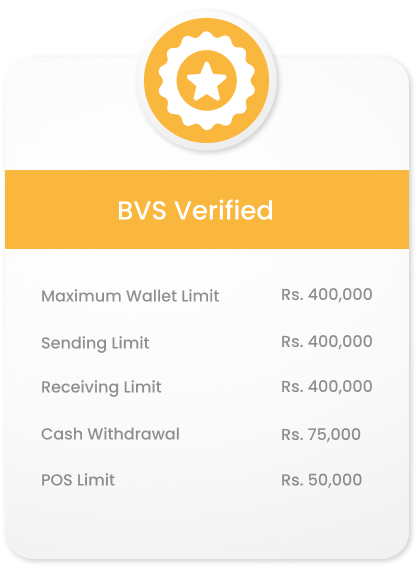
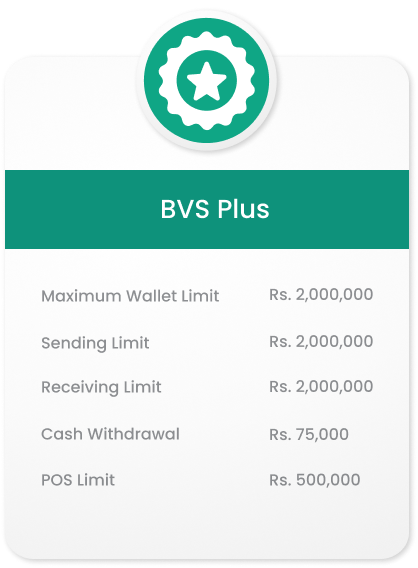
There are 3 account levels with their respective account limits.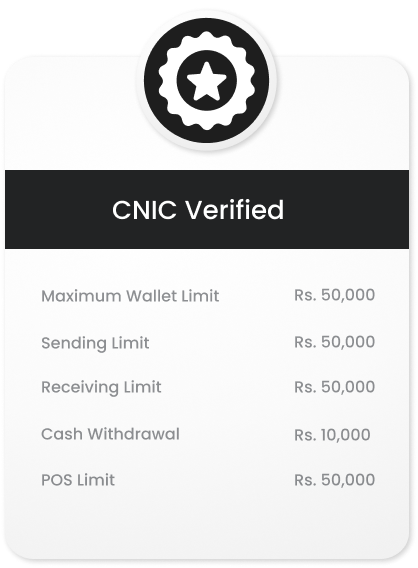
+How can I upgrade my wallet limits?
You can upgrade your wallet limits from 'Account Settings' in the side menu of your Digitt+ app.
+Can Digitt+ be used on both Android and iOS devices?
Yes, the Digitt+ app is available on both Android and iOS.
+Is there any fee associated with registering and using Digitt+?
There is no fee for downloading or registering on Digitt+.
- Digitt+ to Digitt+ account transfer is free of charges
- IBFT upto Rs. 25,000/month is Free.
+Do I need to maintain a minimum balance in my Digitt+ account?
No, there is no requirement to maintain a minimum balance in your Digitt+ wallet. You can use it freely for your financial needs, as per your convenience.
+My wallet status is "Under Review" after registration. What does this mean?
This means your account is currently under verification based on the details you provided during registration. Account approval may take up to 1-2 working days. You shall receive a notification or SMS once your account is approved.
If you encounter any issue or delay, you can contact Digitt+ customer support for assistance.
If you encounter any issue or delay, you can contact Digitt+ customer support for assistance.
+What is Digitt+ wallet PIN?
Your Digitt+ wallet PIN is a 5-digit code used for logging into the app and for completing transactions. For security reasons, it is strongly recommended that you do not share your PIN with anyone.
+I have forgotten my Digitt+ wallet PIN. How can I reset it?
If you've forgotten your Digitt+ wallet PIN, you can reset it by following these steps:
- Open the Digitt+ app and go to the login screen.
- Select the "Forgot PIN" option.
- Follow the prompts to verify your identity, which may include answering security questions or receiving a verification code via SMS or email.
- Once your identity is verified, you'll be able to set a new PIN.
+Can I use fingerprint or face ID to login to the app?
Yes, once your Digitt+ account is approved, you may choose to enable fingerprint or face ID (Biometrics) to login to Digitt+ app. You always have the option to switch back to logging in via your PIN by disabling biometric login option.
+What is Digitt+ customer support/ helpline number?
You can reach the Digitt+ helpline at 042-111-344-488.
+Where can I send email for complaints?
You can email us your complaints at [email protected].
+To whom can I send money from my Digitt+ account?
You can easily send money from your Digitt+ to another Digitt+ account or to any other bank account using your Digitt+ account.
+What are the charges for sending money to a Digitt+ account?
Sending money from one Digitt+ account to another is completely free of charges.
+What are the charges for sending money to any other bank account?
Sending money to any other bank account is free of charge if the amount is within Rs. 25,000. For transactions above that amount, charges will apply as per the Schedule of Charges.
+How can I send money to another Digitt+ account holder?
- Login to your app
- Tap on ‘Send Money’
- Select ‘Digitt+’ transfer type
- Enter account number
- Enter amount
- Verify details and transfer
+How can I send money to another bank account?
- Login to your app
- Tap on ‘Send Money’
- Select ‘Bank Transfer’
- Enter account number
- Enter amount
- Verify details and transfer
+Can I send money from other banking app to my Digitt+ account?
Yes, you can send money from other banking apps to your Digitt+ account. Simply use the transfer option in your banking app, select Digitt+ from the bank list, and enter your Digitt+ account number to complete the transfer.
+How can I add cash to my Digitt+ account?
You can add cash to your Digitt+ account through following ways:
- Add cash with bank transfer
- Cash Deposit Machine (CDM)
+Will I be charged for an incoming amount to my Digitt+ account?
Digitt+ does not charge its customers for any incoming transfers. However, the sender may be charged by their bank.
+What utility bills can I pay from Digitt+ app?
You can pay for electricity, gas, telephone, internet, water, and various other bills (2000+ service providers) through Digitt+ app.
+How can I pay bills from my Digitt+ account?
- Login to your app
- Tap on ‘Payment’
- Select the bill that you want to pay
- Choose bill company from the dropdown menu
- Enter Consumer/ Reference number
- Verify bill details and pay
+Why am I unable to pay my utility bill through the Digitt+ app?
You might be unable to pay utility bills from your Digitt+ app due to following reasons:
- Incorrect Consumer/Reference number
- Solution: Enter correct Consumer/Reference number
- Insufficient account balance
- Solution: Add balance to your account.
- You have consumed your transactional limits
- Solution: Upgrade your account limit
+Are there any charges for paying bills from Digitt+ account?
Paying bills from Digitt+ app is free of any charges.
+Are there any charges for sending mobile load through my Digitt+ account?
Digitt+ does not charge any fees for sending mobile load through your Digitt+ account. However, your mobile service provider may apply charges/taxes for the mobile load transaction.
+Why am I unable to send mobile load from my Digitt+ account?
Digitt+ does not charge any fees for sending mobile load through your Digitt+ account. However, your mobile service provider may apply charges/taxes for the mobile load transaction.
+What if I have entered a wrong mobile number while purchasing Pre-paid load?
You can edit the payment details before the transaction is submitted. The transaction cannot be reverted once it is completed. You are requested to recheck the transaction at ‘Review Details’ screen before the request is processed.
+Can I pay postpaid bill using my Digitt+ account?
Yes, you can easily pay your postpaid bill using your Digitt+ account. Simply select 'Postpaid' from the 'Mobile Loads & Packages' option and enter your postpaid number to complete the payment.
+How can I make mobile package of my own choice?
- Login to your App
- Tap on ‘Mobile Loads & Packages’
- Select ‘Make your own Package’
- Enter the required minutes, messages & data along with the validity
- Digitt+ will recommend the available bundles according to the desired needs.
+How do I order my Digitt+ Debit Card?
Ordering your Digitt+ debit card is quick and easy. Follow these steps:
- Access the Cards Section: Open your Digitt+ wallet and navigate to the cards section from the footer.
- Agree to Terms: Accept the terms and conditions.
- Provide Your Address: Enter the delivery address for your card.
- Choose Your Card: Select the desired card scheme.
- Review and Confirm: Double-check your details.
- Pay the Fee: Complete the payment for the card fee.
- Submit Your Order: click the “Order Card” button. Congratulations! You’ve successfully placed your order. You’ll receive a tracking number on the screen, which you can use to monitor the delivery status of your card. Your card should arrive within 3-5 business days.
+How do I activate my Digitt+ Debit Card?
To activate your Digitt+ debit card, follow these simple steps:
- Navigate to Activation: Go to the card section from the footer of the dashboard and click "Activate Card."
- Enter Card Details: Provide your 16-digit card number and expiry date on the new screen.
- Verify with OTP: An OTP will be sent to you for verification; enter it to proceed.
- Set Your PIN: Create a 4-digit PIN for your card. Remember, this PIN should be kept secure and not shared with anyone. Your card will be activated once the PIN is set.
+What should I do if my card is lost or stolen?
If your card is lost or stolen:
- Freeze Your Card: Immediately freeze your card through the app to prevent unauthorized use.
- Contact Support: Call our helpline at 042-111-344-488 to permanently block the card and request a replacement.
+How do I change my ATM PIN?
To change your ATM PIN, follow these steps:
- Access Card Controls: Navigate to "My Card" in the Digitt+ mobile app.
- Change PIN: Select "Card Controls" from the dashboard, then click "Change PIN." Enter your old PIN, followed by the new one. Once validated, your PIN will be updated.
+How can I apply for a card replacement?
To request a card replacement, please call the Digitt+ helpline at 042-111-344-488.
+My card is expiring or has expired. What should I do?
You'll receive notifications 30 days before and on your card's expiration date, reminding you to replace it. To request a new card, simply tap the in-app notification or the "+" icon in the Cards tab.
+I lost my card. What should I do now?
If you’ve misplaced your Digitt+ debit card:
- Freeze the Card: Immediately freeze your card via the app by navigating to Cards > Freeze Card.
- Contact Support: If you don’t have access to the app, call 042-111-344-488 to freeze your card through Customer Service.
- Request a Replacement: If you cannot find your card, block it permanently by contacting our call center and order a replacement.
+What is the Difference between freezing and blocking a card?
- Freeze: Use this option if you believe you may have misplaced your card. Freezing temporarily disables the card, limiting transactions. Recurring payments, such as subscriptions, will still be processed. You can unfreeze your card at any time through the app.
- Block: If your card has been lost, compromised, or stolen, block it immediately. Once blocked, the card cannot be unblocked, and you will need to order a new one as a replacement.
- Where can I use my PayPak debit card? Your Digitt+ PayPak debit card is accepted at many retail locations and ATMs across Pakistan.
- Can I shop online with my PayPak debit card? Currently, PayPak debit cards are not enabled for online payments.
- Can I use my PayPak debit card for international payments? No, PayPak cards can only be used for in-store purchases and ATM withdrawals within Pakistan.
+My card was captured by an ATM. How can I get it back?
If your card is captured by an ATM:
- Visit the Branch: Go to the specific ATM branch and speak with the manager. The bank typically holds cards for 2 days. Bring your CNIC for identity verification.
- Contact Us: If the bank cannot return your card due to verification issues, call our helpline at 042-111-344-488 and provide the bank's name. We will reach out to resolve the issue.
- Return of Card: If the ATM-captured cards are sent back to us, we will promptly return them to the respective users.
+My card isn’t working while making a physical purchase. What should I do?
If you’re having trouble using your card for a physical purchase:
- Check if the Card is Frozen: Unfreeze your card via the app if needed.
- Verify the PIN: Ensure you’re entering the correct PIN. You can reset it from the app under "Card Controls."
- Check Your Balance: Confirm that you have sufficient funds in your wallet.
- The amount of the transaction.
- The location where you tried to use your card.
- Whether you tried to pay by inserting or tapping the card.
- A screenshot of the error message displayed.
+My card has been delivered to someone else. What should I do?
If the courier status shows your card was delivered and signed for, but you haven’t received it:
- Check with Family/Neighbours: Confirm if someone accepted it on your behalf.
- Contact Support: If the card was delivered to the wrong address, contact us via WhatsApp or our helpline at 042-111-344-488, and we’ll investigate and resolve the issue.
+My card delivery failed because I live in a “non-service area.” What can I do?
If your address is outside Our courier service range:
- Provide an Alternate Address: Contact us via WhatsApp or our helpline at 042-111-344-488 with a complete and accurate alternate address where you can receive the card.
+How can I request to close and delete my account?
You can request the closure and deletion of your account details through any of the following methods:
In-App Support:
Use the in-app customer support to submit your account deletion request.
Call Center:
Contact our support team by dialing 042-111-344-488 and ask our agents to close and delete your account.
Email:
Send an email to [email protected] with a request to close and delete your account.
In-App Support:
Use the in-app customer support to submit your account deletion request.
Call Center:
Contact our support team by dialing 042-111-344-488 and ask our agents to close and delete your account.
Email:
Send an email to [email protected] with a request to close and delete your account.